
Understanding the Executive Suite Dashboard
An Executive Suite account on CE Zoom allows your organization to connect and manage multiple office locations under one centralized dashboard. With this account, you can:
- Oversee company-wide CE compliance
- Monitor license statuses and CE progress across all connected offices & employees
- Support your team with upgraded CE Zoom features
- Streamline renewal tracking and compliance oversight for employees at every location
This account is ideal for organizations that need a unified view of professional compliance across multiple offices or regions.
The Executive Suite Dashboard is organized into a series of Dashboard Modules, each designed to provide visibility into a specific area of your organization, such as employee statistics, compliance, credential management, and continuing education.
Within each Dashboard Module are one or more Dashboard Cards that display real-time statistics, alerts, and quick access to detailed information.
The Executive Suite is organized into three levels:
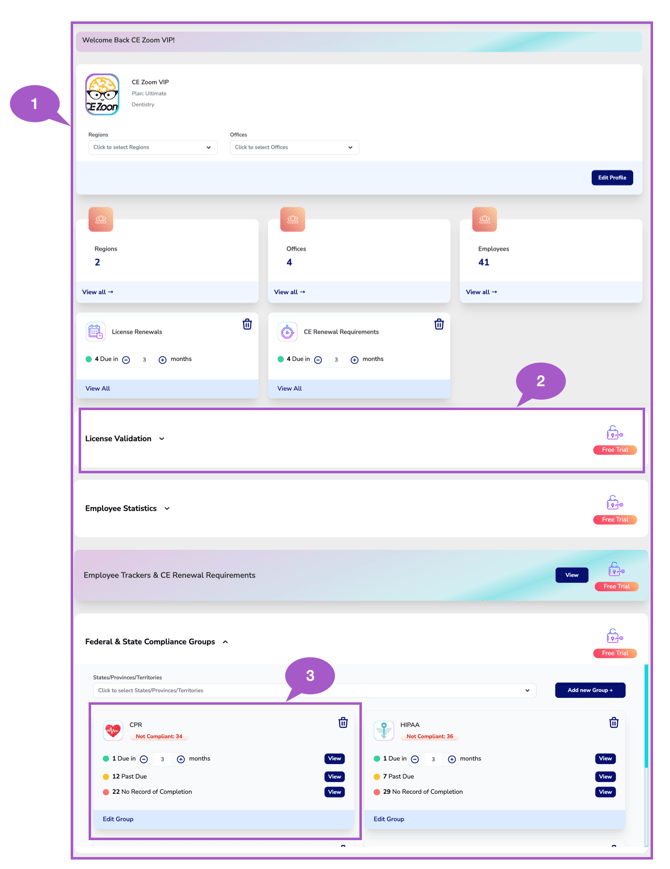
- 1- Executive Suite Dashboard – The complete Executive Suite workspace that provides a centralized view of your organization's operations.
- 2- Dashboard Modules – Expandable sections that group related features and statistics, such as Employee Statistics, Federal & State Compliance Groups, and Enrolled Course Statistics.
- 3 -Dashboard Cards – Individual cards on the dahsboard and within each Dashboard Module that display real-time metrics, summaries, and shortcuts to more detailed information.
This structure makes it easy to navigate between high-level organizational insights and detailed operational data while keeping related information organized in one centralized dashboard.
Each of the following Dashboard Cards and Modules has its own "Understanding" Knowledge Base article that explains its purpose, functionality, and navigation. Use the Quick Links below to access the feature you want to learn about.
Organization Overview & Filters
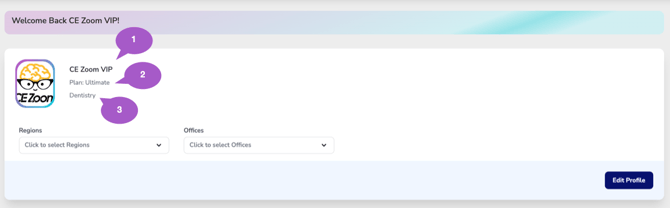
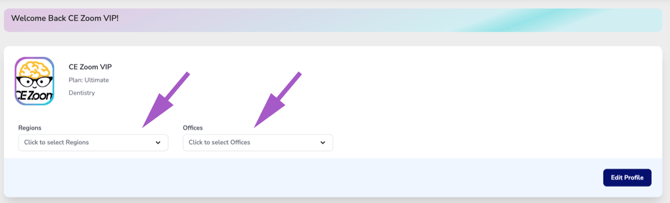
Understanding The Executive Suite Dashboard - Organizational Overview
- Knowledge-Based Article
- Video Tutorial
Executive Dashboard Cards
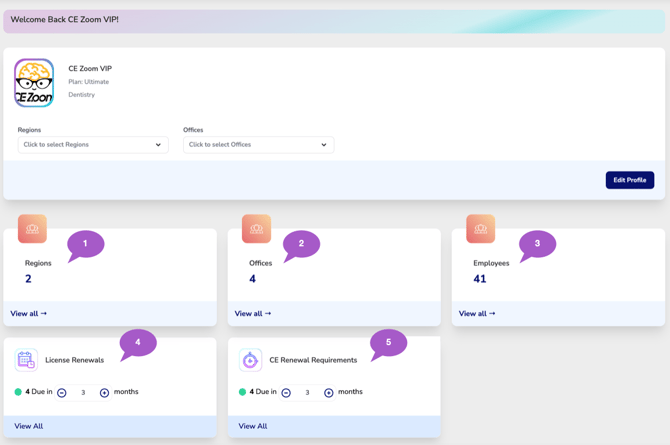
The Executive Suite Dashboard includes several Dashboard Cards that provide an at-a-glance summary of your organization's structure and upcoming renewal activity.
Each card includes a View All button, allowing you to drill down into detailed information for that statistic.
1. Regions
Understanding The Executive Suite Dashboard - Regions
2. Offices
Understanding The Executive Suite Dashboard - Offices
3. Employees
Understanding The Executive Suite Dashboard - Employees
4. License Renewals
Understanding The Executive Suite Dashboard - License Renewals
5. CE Renewal Requirements
Understanding The Executive Suite Dashboard - CE Renewal Requirements
Dashboard Modules
The Executive Suite Dashboard is organized into individual Dashboard Modules, each designed to provide visibility into a specific area of your organization.
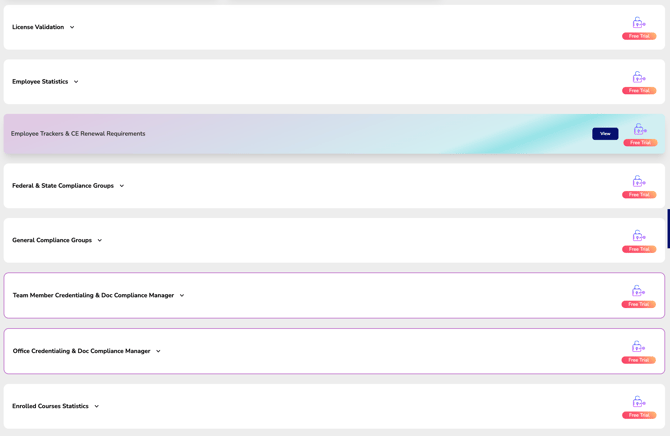
Depending on your organization's subscription and enabled features, modules may include:
- Employee Statistics
Understanding the Employee Statistics:
- Employee Trackers & CE Renewal Requirements
Understanding the Employee Trackers & CE Renewal Requirements
- Federal & State Compliance Groups
Understanding the Federal & State Compliance Groups:
- General Compliance Groups
Understanding the General Compliance Groups:
- Team Member Credentialing & Document Compliance Manager
Understanding the Team Members Credentialing & Documente Compliance Manager:
- Office Credentialing & Document Compliance Manager
Understanding the Office Credentialing & Documente Compliance Manager:
- Enrolled Course Statistics
Understanding the Enrolled Course Statistics:
Each Dashboard Module can be expanded or collapsed independently, allowing you to focus on the information most relevant to your organization.
Summary
The Executive Suite Dashboard serves as your organization's command center, bringing together workforce data, compliance monitoring, continuing education activity, and organizational insights in one centralized location. By using the Region and Office filters together with the individual Dashboard Modules, leadership can quickly move from a high-level organizational overview to detailed operational information with just a few clicks.