
The Federal, State, & General Compliance Groups dashboard provides organizations with a centralized way to monitor recurring compliance requirements that extend beyond continuing education (CE) renewal.
While CE Renewal Tracking focuses on professional license renewal requirements, Compliance Groups track workplace training and recurring compliance obligations required by federal regulations, state laws, accrediting agencies, or your organization's internal policies.
By monitoring these requirements independently from CE renewal, organizations can proactively schedule training, identify compliance gaps, maintain documentation, and ensure every office remains compliant.
Quick Links to Understanding Compliance Groups
Default Compliance Groups (Federal & State)
Understanding the Compliance Group Cards (Federal, State, & General)
States / Provinces / Territories Filter
Creating a New Compliance Group (Federal, State, & General)
Editing Compliance Groups (Federal, State, & General)
Deleting a Compliance Group (Federal, State, & General)
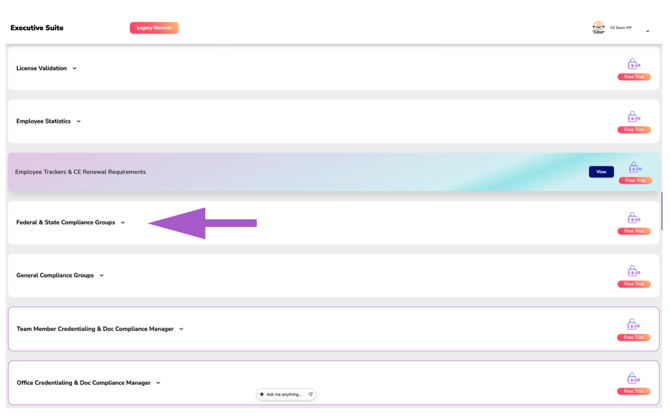
Default Compliance Groups (Federal & State only)
For dental organizations, CE Zoom automatically creates the following compliance groups:
- CPR
- HIPAA
- Infection Control
- OSHA
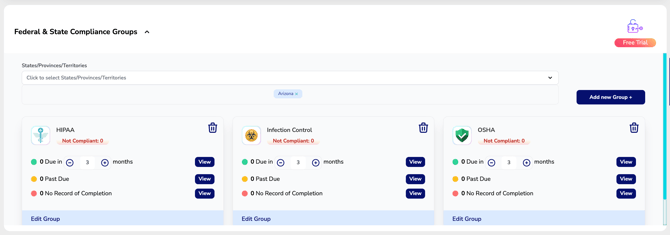
Each default group is initially configured with an annual renewal frequency but can be fully customized to match your organization's compliance policies.
Additional compliance groups can be added at any time as new regulations or organizational requirements arise.
Understanding the Compliance Group Cards (Federal, State, & General)
Each Compliance Group appears as an individual dashboard card that provides a real-time summary of your organization's compliance status for that requirement.
Each card displays:
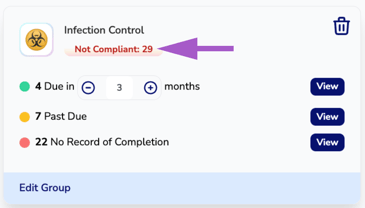
- Total employees currently Not Compliant
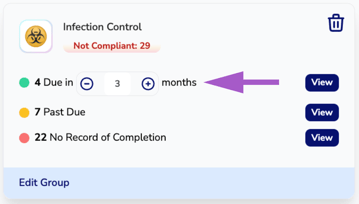
- Employees whose compliance is Due Soon
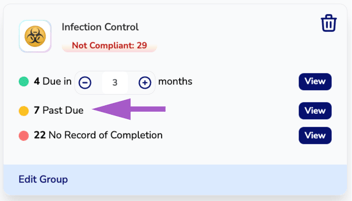
- Employees who are Past Due
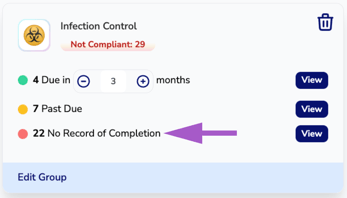
- Employees with No Record of Completion
This allows administrators to immediately identify compliance gaps and prioritize upcoming training.
Not Compliant
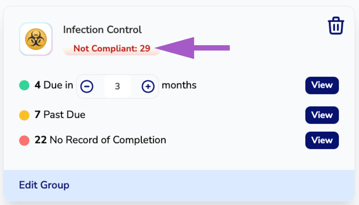
The Not Compliant total represents employees who are currently out of compliance.
This total combines employees who are:
- Past Due
- Missing a required record of completion
The Not Compliant count provides an immediate overview of which compliance groups require attention.
Due In
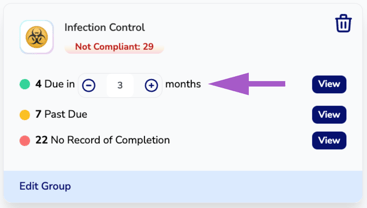
The Due In statistic displays employees whose compliance requirement will expire within the selected timeframe.
Use the + and − controls to adjust the reminder window—for example, one month, three months, or six months—to proactively plan upcoming training and recertifications.
This allows organizations to identify employees who will soon require training before they become non-compliant.
Past Due
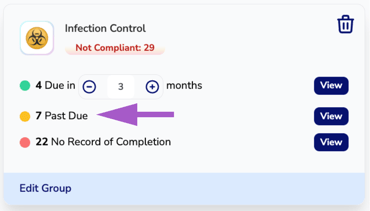
The Past Due statistic identifies employees whose required compliance training has expired.
Employees listed in this category should complete the required training as soon as possible to return to compliance.
No Record of Completion
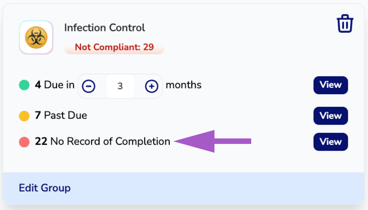
The No Record of Completion statistic displays employees who have never completed—or do not currently have documentation for—the required compliance training.
This is especially helpful for identifying onboarding requirements, missing documentation, or employees who have not yet completed mandatory workplace training.
Viewing Employee Details
Each compliance statistic includes a View button.
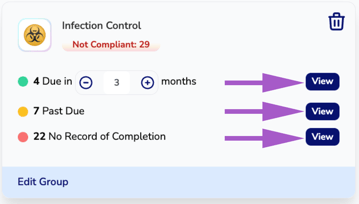
Selecting View opens a detailed list of employees matching the selected compliance status. The list includes each employee's compliance due date or expiration date, along with the number of days until the requirement is due—or the number of days they have been out of compliance.
From this view, administrators can quickly identify:
- Employees due within the selected reminder timeframe
- Employees whose compliance is past due
- Employees with no record of completion
This detailed information makes it easy to prioritize training, schedule recertifications, and maintain organization-wide compliance.
States / Provinces / Territories Filter
Use the States/Provinces/Territories filter to display compliance groups that apply to a specific location.
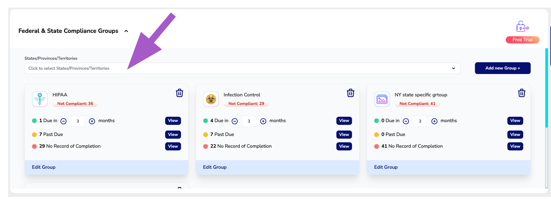
This is especially useful for organizations operating across multiple states where compliance requirements may vary by jurisdiction.
Filtering by location allows administrators to quickly focus on the requirements that apply to employees within a specific state or region.
Creating a New Compliance Group (Federal, State, & General)
Select Add New Group to create a new compliance requirement.
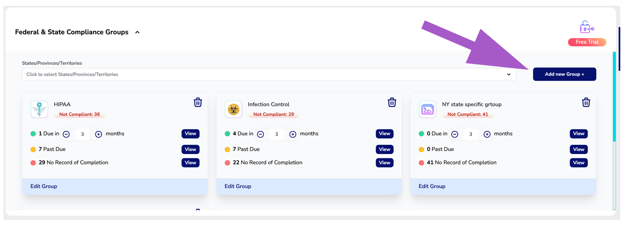
Organizations can quickly create compliance groups for any recurring federal, state, or accrediting agency requirement. This flexibility allows you to immediately begin tracking new compliance requirements as regulations change or organizational policies evolve.
How to create a Federal & State & General Compliance Group
How-to Article
Video Tutorial
Editing Compliance Groups (Federal, State, & General)
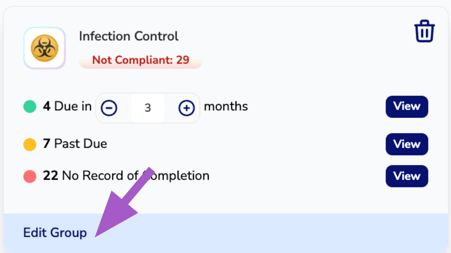
Each Compliance Group can be customized to meet your organization's specific requirements.
When editing a group, you can configure:
- The compliance requirement being tracked
- Required course topics
- Approved providers or course sources
- Which professions or employees must complete the requirement
- Renewal frequency
This flexibility allows each Compliance Group to accurately reflect your organization's compliance policies while adapting to changing regulations.
How to Edit a Federal & State & General Compliance Group
How-to Article
Video Tutorial
Deleting a Compliance Group (Federal, State, & General)
If a compliance requirement is no longer needed, click the Trash icon on the compliance card.
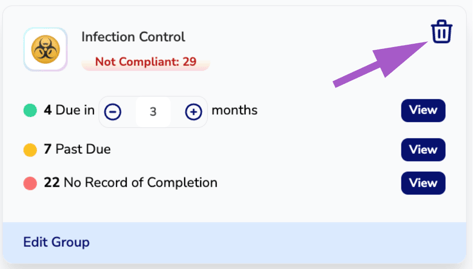
Removing a Compliance Group stops monitoring that requirement but does not delete employee records, completed CE activities, or historical training documentation.
How to Delete a Federal & State & General Compliance Group
How-to Article
Video Tutorial
Summary
Federal & State Compliance Groups provide organizations with complete visibility into compliance requirements that extend beyond continuing education renewal.
By tracking recurring compliance obligations separately from CE renewal requirements, organizations can proactively schedule training, identify compliance gaps, maintain documentation, and ensure every office remains compliant with federal regulations, state laws, accrediting requirements, and internal organizational policies, all from one centralized dashboard.