
The Federal & State Compliance Groups dashboard provides organizations with a centralized way to monitor recurring compliance requirements that extend beyond continuing education (CE) renewal.
While CE Renewal Tracking focuses on professional license renewal requirements, Compliance Groups track workplace training and recurring compliance obligations required by federal regulations, state laws, accrediting agencies, or your organization's internal policies.
These groups can be used to track requirements such as HIPAA, OSHA, Infection Control, CPR, state-mandated training, or other organization Federal & State-specific compliance requirements. You determine which courses satisfy the requirement, how often it must be completed, and, when needed, which providers or professions qualify.
Once created, CE Zoom can use employees’ CE records to determine whether the requirements established by your organization have been satisfied.
Creating a New Compliance Group
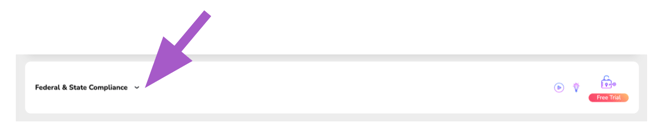
From your Executive or Office Manager Dashboard, scroll down to Federal & State Compliance and expand the section.
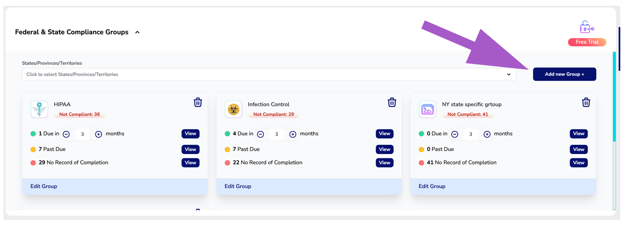
Select Add New Group to begin creating a new compliance requirement.
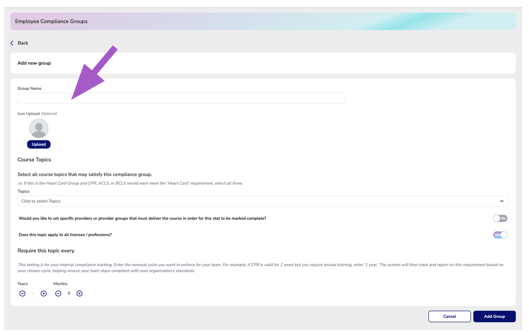
Enter the Group Name
Enter a clear name that identifies the requirement being tracked.
For example:
- HIPAA (default group)
- OSHA (default group)
- Infection Control (default group)
- CPR / Heart Card (default group)
- State-Mandated Opioid Training
The Group Name is what your organization will see when reviewing employee compliance.
⚠️ You can delete any default group if it is not important to your organization
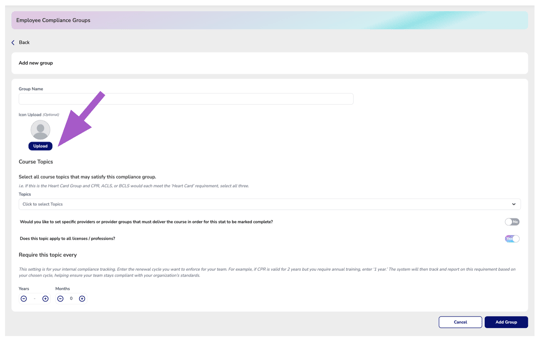
Upload an Icon — Optional
You may upload an image or icon to visually represent the compliance group.
This is optional and does not affect how the requirement is tracked.
Select the Course Topic(s)
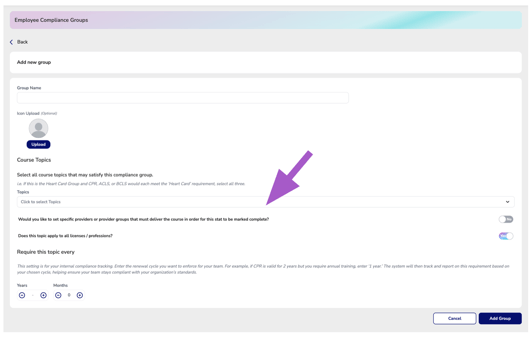
Under Course Topics, select all topics that should be accepted as satisfying this compliance requirement.
You can select more than one topic when multiple types of courses should count toward the same requirement.
Example: If you create a Heart Card compliance group and courses categorized as CPR, ACLS, or BCLS should all satisfy the requirement, select all three topics.
Important: The topics you select tell CE Zoom which CE activities may be used to satisfy this compliance group. Be sure to include every acceptable topic.
Set Provider Requirements — If Needed
Use the Specific Providers or Provider Groups setting when the course must be delivered by an approved provider in order to satisfy the requirement.
Select Yes if the compliance requirement must be completed through specific providers or provider groups.
Once the toggle is set to Yes, the Required Providers field will appear. Click Providers and select all providers or provider groups that are approved to deliver the training for this requirement.
Only courses that meet the selected topic criteria and are delivered by one of the selected providers will satisfy the compliance group.
Leave this setting as No when the provider does not matter and any course matching the selected topic criteria may qualify.


Determine Whether the Requirement Applies to All Licenses / Professions
Use Does this topic apply to all licenses / professions? to determine who should be evaluated for this requirement.
Select Yes (default) when the compliance requirement applies to everyone included in your organization, regardless of their license or profession.
Select No when the requirement should only apply to specific licenses or professions. You can then identify which professional groups should be evaluated for the requirement.


Set How Often the Requirement Must Be Completed
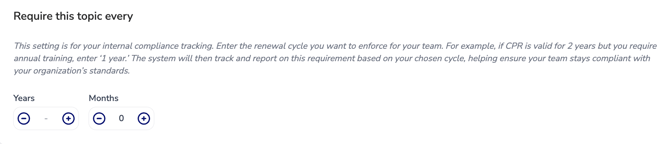
Under Require this topic every, enter the renewal cycle your organization wants CE Zoom to enforce.
Enter the appropriate number of Years and/or Months.
For example, if your organization requires:
HIPAA every year → Enter 1 Year
CPR every 2 years → Enter 2 Years
State or Federal Training every 6 months → Enter 6 Months
This cycle represents your organization's internal compliance standard. It does not have to match the expiration period normally associated with the course or credential ce renewal requirements.
For example, if a CPR certification is valid for two years but your organization requires employees to complete CPR training annually, enter 1 Year. CE Zoom will track the requirement according to your organization's annual standard.
Add the Compliance Group
Review your selections to make sure the topics, provider restrictions, applicable professions, and renewal cycle accurately represent the requirement.
Click Add Group to save and activate the new compliance group.

How CE Zoom Uses the Compliance Group
After the group is created, CE Zoom evaluates applicable employee CE records against the criteria you established.
A CE activity must meet the applicable topic, provider, profession, and renewal-cycle criteria before it can be used toward that compliance requirement.
This gives your organization the ability to establish its own Federal and State Compliance standards and quickly identify employees who have completed a requirement, are approaching renewal, or still need to complete required training.