
The Test Manager allows you to build, edit, and assign course assessments required for CE verification. Create structured tests, set passing criteria, and ensure attendees successfully complete all requirements before receiving CE credit.
Course Knowledge Assessment Setup
Use this screen to assign or create the post-course knowledge assessment test for your CE activity. CE Zoom will automatically issue, grade, and record the test results for participants.
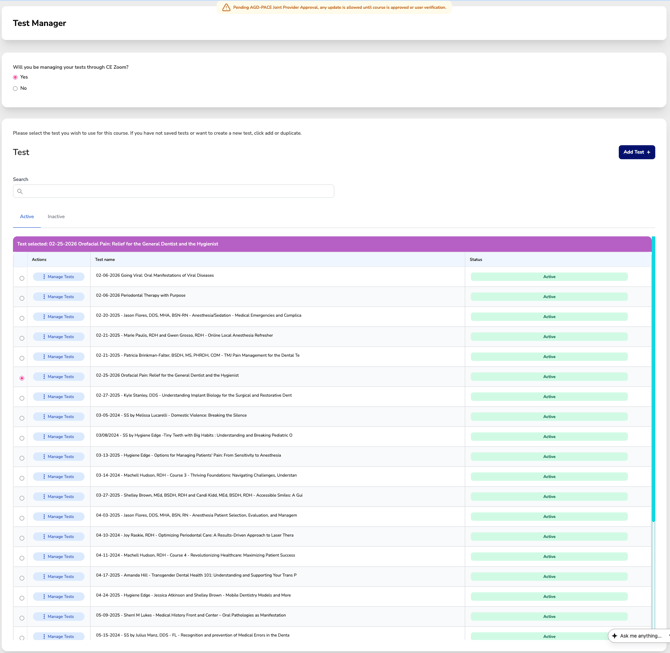
Will you be managing your tests through CE Zoom?

-
-
Yes – Enables you to assign or create a test that will be automatically handled by CE Zoom.
-
No – Select this if you are administering tests outside the CE Zoom platform (e.g., on paper or through a third-party system).
-
Selecting a Test:
-
-
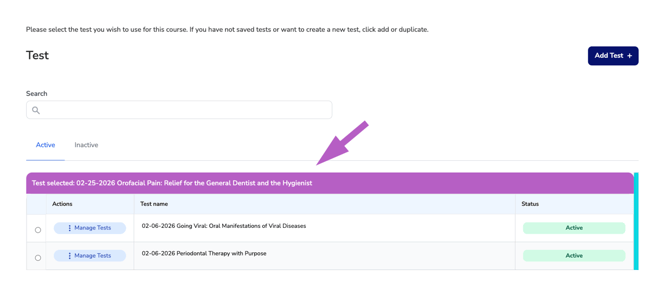
Use the radio buttons to select the test you’d like to assign to this course.
-
The selected test will be highlighted in the “Test selected” purple bar above the table.
-
Managing Tests:
-
-
Click Manage Tests to view, edit, or change status of a test
-
Add a New Test:
-
-
Click “Add Test +” if you don’t have an existing test or would like to build a new one from scratch.
-
Active / Inactive Tests
-
-
By default, only Active tests are displayed in the list below.
-
To view previously created but inactivated tests, click the “Inactive” tab.
-
You can select an inactive test to use for your course—just make sure to review it to ensure it is relevant.
-