
Why Use CE Zoom’s Provider Statement & Logo Manager?
You work hard to obtain and maintain your provider approvals, and we know how important it is to follow the strict guidelines for logo placement and approval statements. CE Zoom’s Provider Statement & Logo Manager takes the hassle out of tracking renewal periods and ensures your certificates remain compliant—automatically.
With this feature, CE Zoom:
- Tracks renewal periods for your provider approvals
- Automatically updates the logo and approval statement on each issued CE certificate
- Eliminates the need to create new certificates each time your approval is renewed
This is especially valuable for self-study courses, where course listings often extend beyond a single approval period. Instead of relisting courses or manually updating certificates, CE Zoom ensures compliance by seamlessly managing provider logos and statements—as long as you keep your approved provider details up to date.
Let CE Zoom handle the details so you can focus on delivering quality education!
Accessed from the Navigation Menu
-
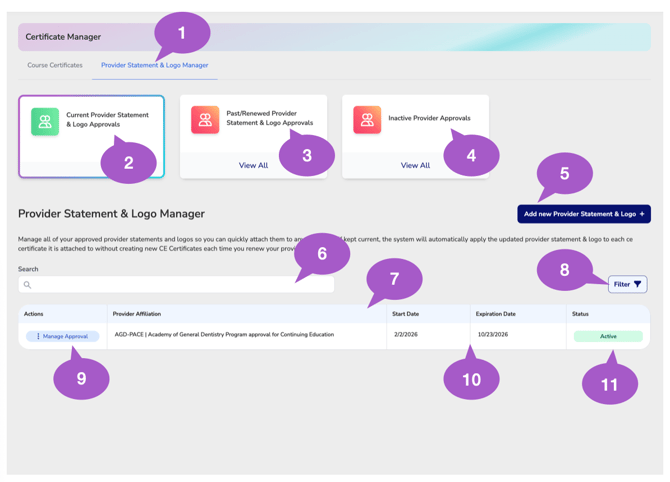
Provider Statement & Logo Manager Tab
Use the Certificate Manager tabs to switch between Course Certificates and the Provider Statements & Logo Manager.
Provider Statements & Logo Manager – Create and manage the provider statements and logos that can be applied to your CE certificates.
Course Certificates – Create, edit, and manage the certificate templates that can be assigned to your courses.
The tabs allow you to quickly navigate between certificate templates and the branding elements used on those certificates without leaving the Certificate Manager. -
Current Provider Statement & Logo Approvals
Displays provider and accreditation statements and logos that are currently active and available for certificate use.
-
Past / Renewed Provider Statement & Logo Approvals
Displays the historical versions of provider statements and logos that have since been renewed and replaced by a newer approval record, or expired. These records are retained for historical reference and are no longer the active approvals.
-
Inactive Provider Approvals
Displays provider statements and logos that are inactive and no longer available for selection.
-
Add New Provider Statement & Logo
Select Add New Provider Statement & Logo to create a new provider statement and logo approval record for use on your CE certificates.
The Provider Statements & Logo Manager is the recommended location for creating and managing your provider approvals and accreditations. Records created here are immediately available for selection when creating or editing CE certificates, helping streamline the certificate creation process.
For added convenience, provider statements and logos can also be created directly from within the Course Wizard whenever needed.
-
Search Provider Records
Use the search bar to quickly locate provider statements and logos by provider name or affiliation.
-
Provider Statement & Logo Table
The Provider Statement & Logo Table displays provider statements and logos based on the approval status you've selected.
Use the status cards at the top of the page to switch between Current, Past/Renewed, and Inactive provider approvals and accreditations.
The table automatically updates to display the corresponding provider records, including approval details, effective dates, expiration dates, and each record's current status.
-
Filter Provider Records
Use filters to narrow provider records based on industry and provider type.
-
Manage Approval
Select Manage Approval to view, edit, renew, update, or otherwise manage an existing provider statement and logo approval.
The Provider Statement & Logo Manager serves as the central location for maintaining your provider approvals and accreditations. Keeping your approval records current allows CE Zoom to automatically determine which provider statements, logos, approval dates, and accreditation information should appear on each CE certificate.
This centralized approach eliminates the need to manually update individual certificates, ensuring newly issued CE certificates always display the most current provider approvals, statements, logos, and approval periods.
-
Provider Approval Dates
Displays the active date range for the provider approval or accreditation, including the approval start date and expiration date used to determine when the provider record is valid.
-
Provider Status
Displays whether the provider statement and logo are currently Active or Expired.