
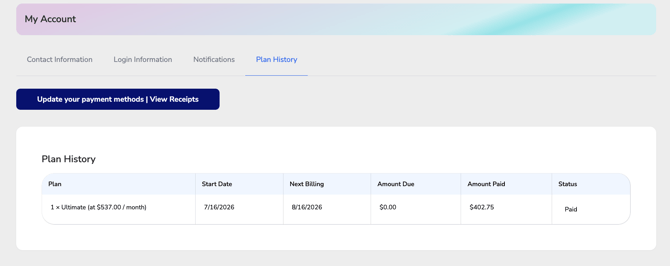
The Plan History tab provides a summary of your current CE Zoom membership plan and billing activity. From this page, you can review your active subscription, view billing details, monitor upcoming payments, and check the status of your invoices.
All CE Zoom memberships are 12-month subscriptions and may be billed annually or monthly, depending on the plan selected during enrollment or renewal.
Information DisplayedYour Plan History includes the following information for your current membership:
Plan
Professionals: Displays your active subscription plan, the number of licenses included, and the regular billing amount for the current subscription.
Office Managers & Executive Suites: Displays your active subscription plan and the regular billing amount for the current subscription.
Start Date
Shows the date your current 12-month membership period began.
Next Billing
Displays the date your next scheduled payment will be processed based on your selected billing schedule.
Amount Due
Shows the amount currently outstanding on the invoice, if any. Once payment has been received, this amount will display $0.00.
Amount Paid
Displays the amount that has been successfully applied toward the current invoice.
Status
Shows the current status of the invoice, such as:
- Paid – The invoice has been paid in full.
- Pending – Payment is awaiting processing.
- Past Due – A payment remains outstanding.
- Additional statuses may be displayed based on the current billing state.
Select Update Your Payment Methods | View Receipts to:
- Update your saved payment method.
- Update billing info for notifications and receipts.
- View or download payment receipts.
- Review billing history and invoice details.
Things to Know
- All CE Zoom memberships are 12-month subscriptions, regardless of whether they are billed monthly or annually.
- The Next Billing date reflects your next scheduled payment—not the end of your membership term.
- The Amount Due and Status fields update automatically as payments are processed.