
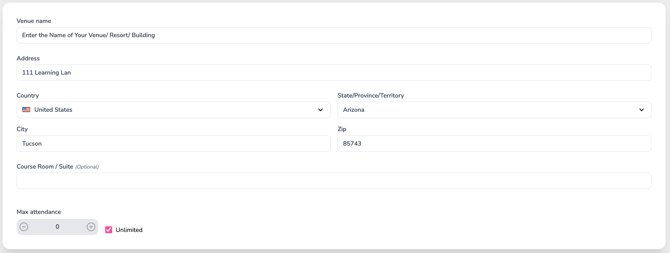
Venue Info (This is only for Live In-person events)
-
Venue Name – Enter the name of the facility or location hosting the course.
-
Address – Fill in the street address where the course will take place.
-
Country, State/Province, City, Zip – Complete all applicable location fields for accurate mapping and attendee information.
-
Course Room / Suite (Optional) – Include the specific room, suite, or floor if applicable for larger venues.
Accurate venue details help ensure participants know exactly where to go and allow CE Zoom to display correct info on course listings.
Max Attendance
Set a limit on how many people can register for your course.
-
Use the + / – buttons to increase or decrease the maximum number of attendees
-
If there is no limit, check the Unlimited box
The max attendance setting is enforced during registration. Once the maximum number of seats is reached, registration will close and the course will display as sold out.
Limiting attendance helps with capacity planning and ensures a manageable group size for hands-on or interactive sessions.