
Course Postings / Add On's - Course Posting Summary
This page summarizes the key details you've selected for listing your Self-Study Course on CE Zoom. It provides a final review before moving forward and ensures transparency about course posting credit usage.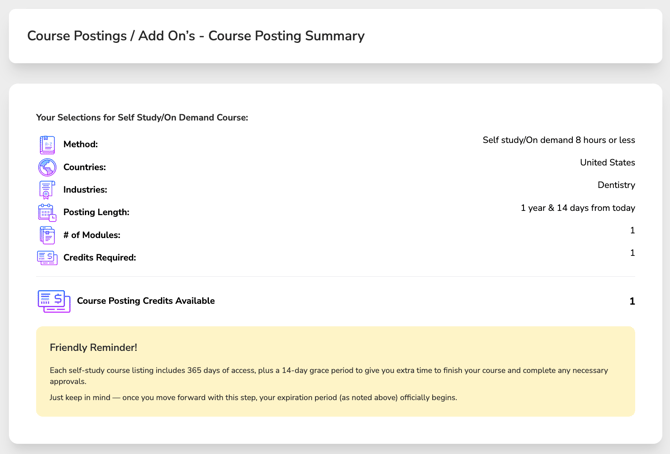
Review Course Posting Selections:
-
- Method: How the course will be delivered (Self-Study | On-demand)
- Countries: Where the course will be listed
- Industries: The professional fields your course is targeting
-
Posting Length: The length of time your course will be available to attendees as a Self-Study offering. Each course posting is active for up to 1 year and 14 days (379 days), beginning when you click Continue on this page.
The additional 14-day grace period is provided to allow you to complete the remaining Course Wizard steps and obtain any required accreditor approvals before your course is published.
If you are not ready to begin your course posting period, do not click Continue. Selecting Continue will activate your course posting, consume the required course posting credits, and start the 379-day posting period.
Please note: If you leave the Course Wizard before clicking Continue, the information entered up to this point will not be saved.
- # of Modules: Modules allow you to group related sections of your course for easier navigation and tracking. CE certificates can be issued after each module or upon completion of the full course, depending on your setup.
⚠️ Self-study courses longer than 8 hours must be divided into modules, each no more than 8 hours in length. - Credits Required: Displays the total number of course posting credits required for your course posting. The total is calculated based on the number of modules and industries you've selected, with one course posting credit required for each module and each selected industry.
- Course Posting Credits Available:
The system displays how many course posting credits your company currently has.- If you do not have enough credits:
The system will alert you that more credits are required and guide you to purchase them directly within the course creation wizard.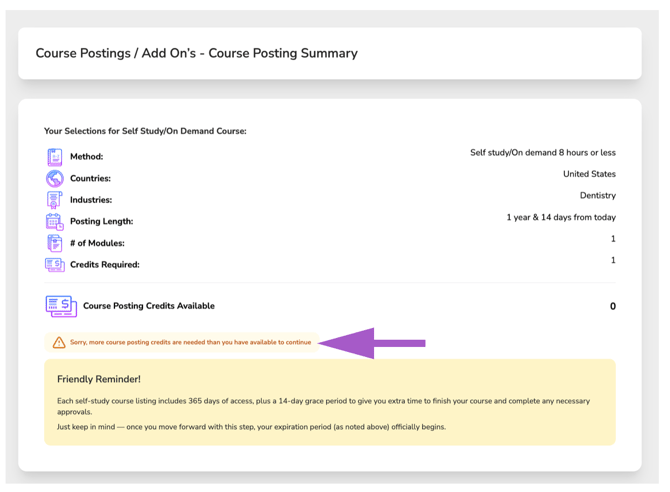
- If you do not have enough credits:
Once everything looks correct and you have enough credits, click Continue to proceed.