This page summarizes the key details you've selected for listing your Single Live Course on CE Zoom. It provides a final review before moving forward and ensures transparency about course posting credit usage.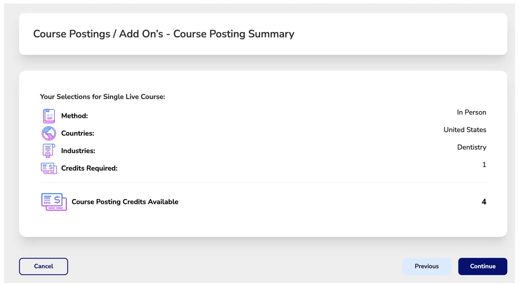
-
Review:
-
Method: How the course will be delivered (In Person, Virtual, or Both)
-
Countries: Where the course will be listed
-
Industries: The professional fields your course is targeting
-
Credits Required: The number of course posting credits needed based on selected industries
-
-
Check your available credits:
The system displays how many course posting credits your company currently has. -
If you do not have enough credits:
The system will alert you that more credits are required and guide you to purchase them directly within the course creation wizard.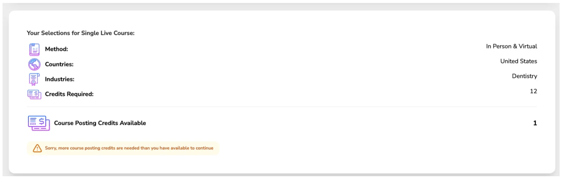
- Click continue to be advanced to the pricing guide to purchase needed credits.
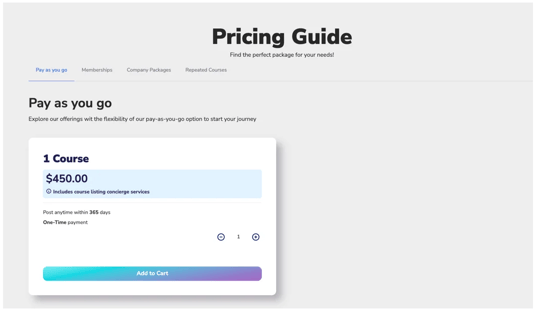
- We offering different options to fit your needs
-
Pay As You Go
-
Use the plus (+) and minus (–) buttons to select how many individual course posting credits you need.
-
Click “Add to Cart” once your total is set.
Memberships
-
-
Choose the package that fits your needs (10, 15, 20, or 30 courses/year).
-
Select whether you'd like to pay in full or choose a 12-month installment plan (note: 10% fees apply to installments).
-
All memberships are auto renewing annual subscriptions and include the selected number of course postings per year.
-
- Click continue to be advanced to the pricing guide to purchase needed credits.
Once everything looks correct and you have enough credits, click Continue to proceed.
Click the cart icon in the upper right corner to review added items.
Click Continue to move to the Add-Ons section.
Here, you can select any optional services (like AGD joint providership).
If additional credits are required for your selections, you’ll be prompted to add them.
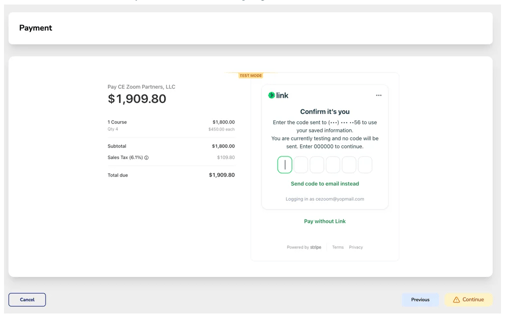
Click Continue to proceed to the payment screen.
Once payment is processed, you can continue building and adding your event.