
Overview
This section defines how your course will be offered, whether it includes a hands-on component, how it will be titled, and who can see and register for it. These selections help ensure your course is displayed correctly and reaches the intended audience.
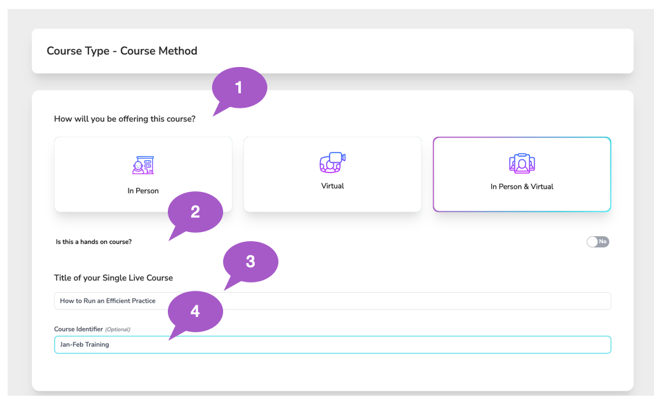
1. Select the Course Delivery Method
Choose how participants will attend your course:
-
In Person – For courses held at a physical location.
-
Virtual – Live, online courses where participants engage in real time through a video platform, similar to an in-person class but conducted remotely.
-
In Person & Virtual – A hybrid format that allows participants to attend either at a physical location or virtually in a live, interactive session.
2. Indicate if the Course Is Hands-On
Use the Yes / No toggle to indicate whether the course includes a hands-on learning component.
This helps set participant expectations and supports accurate course categorization.
3. Enter the Course Title
Course Title Best Practices
Choose a course title that clearly reflects the learning objectives and primary focus of the course. The title should accurately describe what participants will learn and should not be misleading or overly broad.
For example, avoid labeling a course as “Infection Control” if the content primarily focuses on specific techniques such as instrument processing or operatory cleaning. While these topics relate to infection control, they do not represent the full scope of a comprehensive infection control course.
Selecting a precise and accurate title helps:
-
Set proper learner expectations
-
Support compliance and accreditation standards
-
Ensure participants receive credit for the correct type of education
Being thoughtful and specific with your course title promotes clarity, trust, and consistency across course records.
4. Course Identifier
The Course Title is the official name of your course and will appear on the CE Certificate.
The Course Identifier is an optional field you can use to add extra details that help distinguish this course from similar courses in your account and course search results. This identifier is displayed to attendees during registration and within your company account.
Common uses include:
- Location identifiers — West Valley, Phoenix Office, Tucson Campus
- Company or branch identifiers — North Region, Team A, Pediatric Division
- Series progression — Year 1, Part 2, Advanced Track
- Course sequencing or prerequisites — Take After OSHA Basics, Recommended Before Course XYZ
Use this field anytime additional context would help attendees or administrators quickly recognize the correct course.