
Course Creation Options
There are 2 options: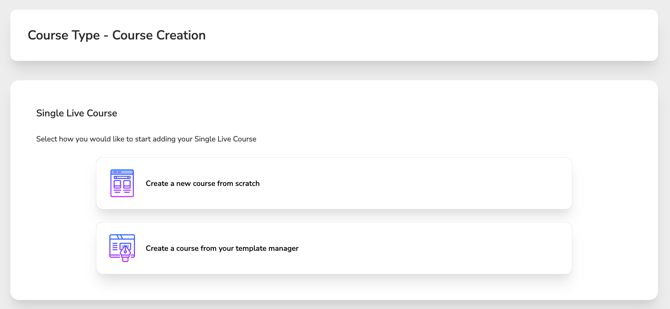
Create a New Course from Scratch
Select this option to start fresh and manually enter all course details.
-
All Course Wizard fields will be available
-
Best for brand-new courses or one-off events
-
Full flexibility to customize every section
Create a Course from Your Template Manager
Select this option to duplicate a saved template and automatically populate your course with preconfigured details.
-
Speeds up course setup
-
Ensures consistency across repeated or recurring courses
-
Reduces manual data entry
Once selected, choose a template to auto-fill your course with the saved template details.
Template Types & Editing Rules
Non-Approved Templates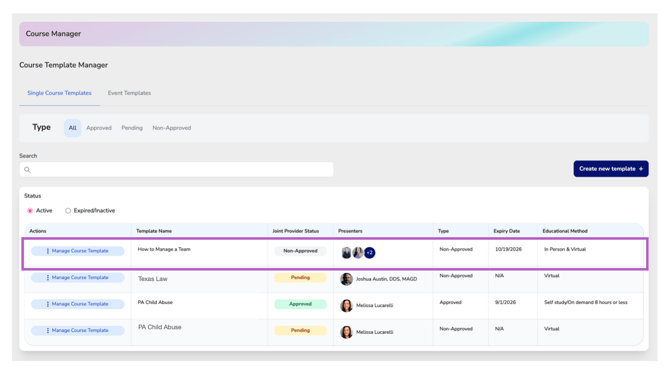
These are internal templates created by your organization that have not gone through a joint provider approval or course verification process.
-
All Course Wizard fields remain fully editable
-
Ideal for internal training or non–joint provider courses
Approved Joint Provider Templates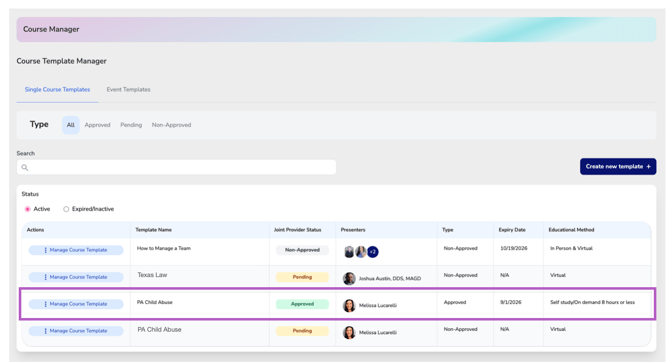
These templates have been reviewed and approved through a joint provider partnership or by a regulating body.
-
Certain sections of the Course Wizard will be locked to maintain compliance
-
Locked sections cannot be edited
-
If changes are required in locked areas, a new course must be submitted for approval
Important:
Approved Joint Provider Templates allow the offering company to use the joint provider approval for up to one year from the approval date, without paying joint provider fees for each posting.
However, each course must still be posted individually.
Pending Joint Provider Templates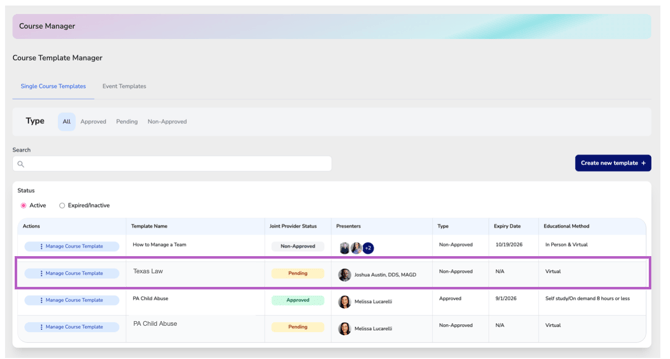
Pending templates are courses that are currently in the joint provider approval process but have not yet been approved.
Until approval is complete, pending templates function the same as non-approved templates:
-
All Course Wizard fields remain fully editable
-
No joint provider fee waiver applies while the template is pending
Because the template has not yet been approved, any course created from a pending template does not receive joint provider benefits.
Important Consideration
To avoid paying additional joint provider fees, it is recommended to complete the approval of the original course. Once approved, the template can be used as an Approved Joint Provider Template, allowing you to reuse the approval for up to one year and streamline future course postings.