
Identify the main point of contact for your course and determine who should handle specific attendee questions. Assigning the correct contact ensures support inquiries are directed to the right person, improving response time and overall attendee experience.
Contact Information Instructions
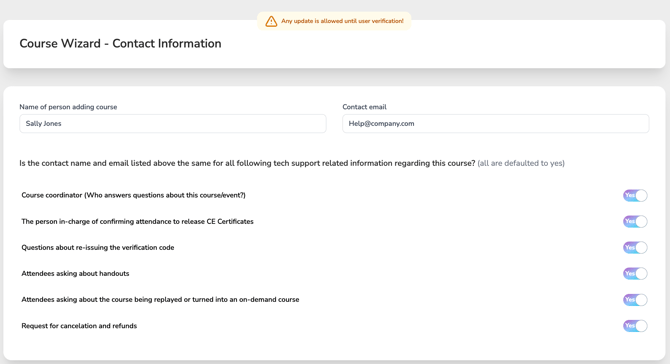
Use this section to identify the primary contact for the course and manage who should handle specific support questions from attendees.
-
Name and Email of Person Adding the Course
This will be the default contact for all course-related support unless otherwise specified. - Default Settings:
-
All categories below are automatically set to “Yes”, meaning the person listed as adding the course will be the contact for:
-
General course questions (Course Coordinator)
-
CE Certificate confirmation
-
Re-issuing verification codes
-
Questions about handouts
-
Replay/on-demand course requests
-
Cancellations and refunds
-
- To Assign a Different Contact:
-
Toggle to “No” for any category where a different person should handle that inquiry.

-
Then, enter the contact name and email of the appropriate person.
-
This ensures attendee questions are directed to the right person for a faster, more accurate response.