
Use this section to configure how your course operates within CE Zoom. These settings control attendee verification, support permissions, sponsorship requirements, Elite eligibility, and course format options. All toggles are pre-set to default values but can be adjusted based on your course structure and compliance needs.
Additional Info Settings
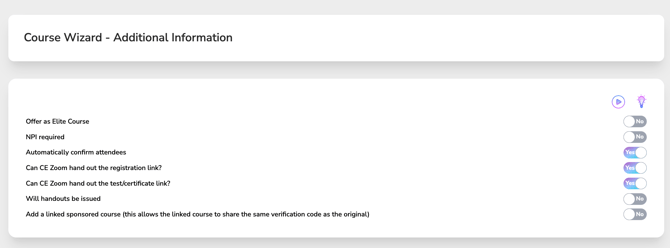
Use this section to customize how your course will function on CE Zoom. All toggles are set to the default values shown in the screenshot.
Descriptions of Each Option:
-
Offer as Elite Course (Default: No)
Toggle to Yes if this course is part of CE Zooms Elite tier offerings (if applicable to your account type). -
NPI Required (Default: No)
Toggle Yes if you require attendees to enter their National Provider Identifier in order to receive their CE Certificate as required by the Sunshine Act for manufacturers. -
Automatically Confirm Attendees (Default: Yes)
When enabled, CE Zoom will automatically confirm attendance without manual review as long as the attendee has successfully verified the course with the correct course completion verification code. -
Can CE Zoom Hand Out the Registration Link? (Default: Yes)
Allows CE Zoom to share your registration link with users who contact support about your course. -
Can CE Zoom Hand Out the Test/Certificate Link
Allows the CE Zoom Support Team to provide attendees with the direct link used to complete your course assessment and obtain their CE certificate.
If your course includes a test, this link will take learners directly to the course assessment. If no test is required, the link will direct learners to the page where they can log in and immediately receive their CE certificate after successfully completing the course requirements.
Enabling this option allows our support team to quickly assist attendees who have misplaced or cannot locate their course completion link.
-
Will Handouts Be Issued? (Default: No)
Toggle to Yes if you will provide downloadable handouts to attendees, add the handout notes, and upload the handout file. - Add a Linked Sponsorship Course (Default: No):
Toggle to Yes if you are offering a single course but need to provide a sponsor with their own unique registration link.
This feature allows you to link the sponsored registration version of the course to the primary course, ensuring both versions share the same course completion verification code.
By connecting the courses, you maintain one unified verification process while still giving sponsors their own branded registration pathway.