
Overview:
Upgrading your Executive Suite plan gives your organization and connected team members access to additional features and resources based on your team's needs. From the Executive Pricing Plans page, you can compare available plans, adjust the number of office locations, and add additional license connections before completing your upgrade.
Whether you're looking to expand employee access, enhance compliance tools, or connect more offices, CE Zoom will work with you to find the best solution and pricing. Please do not hessitate to reach out to help@cezoom.com.
Steps to Explore Plans and Upgrade:
-
From your Dashboard, click “Plans” in the left navigation menu.

-
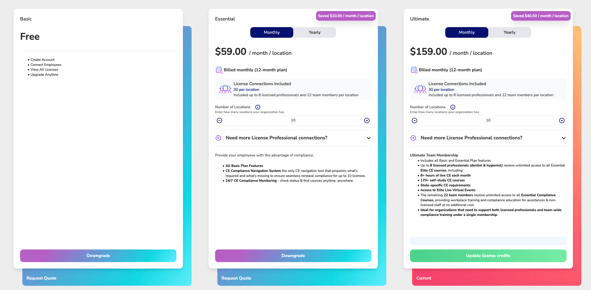
On the Executive Pricing Plans page, you'll see a side-by-side comparison of the available plans (such as Basic, Essential, and Ultimate).
-
Review the descriptions and features under each plan to determine which best fits your organization’s needs.
-
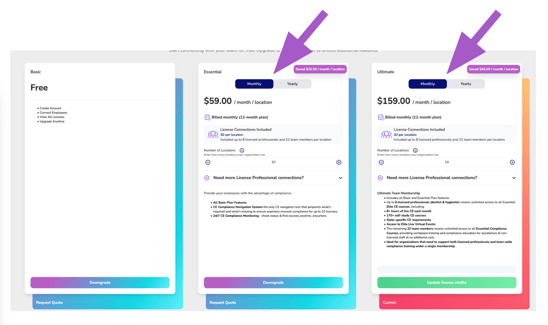
If the selected plan offers both billing options, choose either:
- Monthly (12-month commitment, billed monthly)
- Yearly (billed annually)
The pricing displayed will automatically update based on your selection.
-
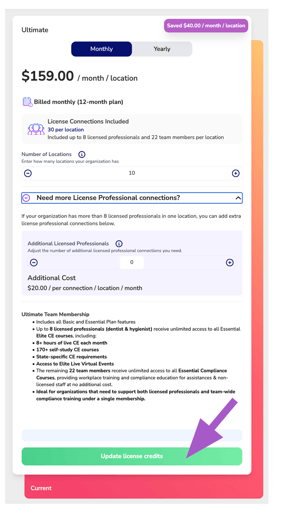
Use the Number of Locations field to enter the total number of office locations included in your organization.
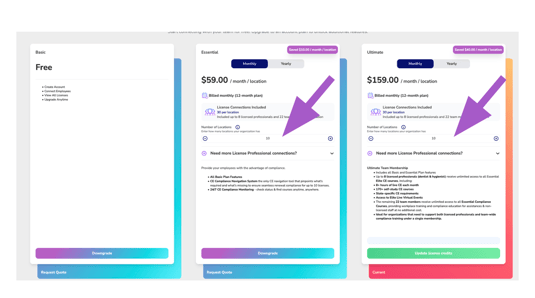
Each office location receives 30 license connections as part of your Executive Suite membership, broken into 8 licensed professionals and 22 team members per location
Example: If your organization has 10 office locations, your membership includes 300 license connections (80 licensed professionals & 220 team members).
Note: Each professional license monitored for an employee uses one license connection. Employees with multiple licenses will consume one connection for each license being monitored.
- Add Additional License Connections (Optional)
If your offices require more than the included 30 license connections per location, expand the Need More License Professional Connections? section.
Enter the number of additional license connections needed per office location.
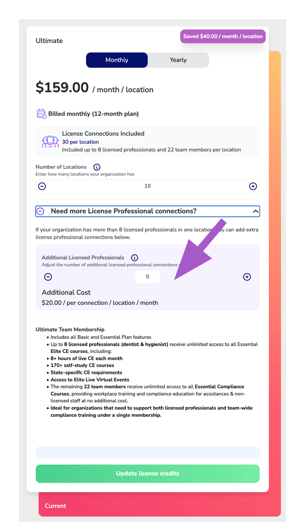
Important: Additional license connections are applied to every office location in your organization—not just a single office.
Example: If you have 10 office locations and add 1 additional license connection, each office will receive one extra connection. Your organization will receive 10 additional license connections in total.
Adjust the quantity until it reflects the number of additional connections each office requires.
- Complete Your Upgrade
After reviewing your selections, click the action button at the bottom of your chosen plan (such as Upgrade, Update License Credits, or the applicable action for your plan).
Review the order summary, complete the payment information if prompted, and confirm your upgrade.
Once your purchase is complete, your Executive Suite membership and available license connections will be updated automatically.
Important Notes
- Every office location includes 30 license connections (8 for professional licenses and 22 for team members) with your membership.
- Each monitored professional license uses one license connection.
- Employees with multiple monitored licenses consume multiple license connections.
- Additional license connections are purchased per office location and are applied to all locations within your organization.
- Your available license connections can be viewed from your Executive Suite dashboard after the upgrade is complete.
Looking for Enterprise Pricing?
Organizations with a large number of locations or unique requirements may qualify for custom pricing. Contact our team to learn more.