
Your Presenter Information settings help companies and educational organizations better understand your speaking specialties, industries, and areas of expertise when connecting you to courses through CE Zoom.
By keeping your presenter profile accurate and up to date, offering companies can more easily identify:
- The countries you present in
- The industries you speak within
- The topics you teach or specialize in
This information helps streamline the speaker connection process and improves visibility for presenters looking to teach educational activities through CE Zoom.
Why Your Presenter Information Matters
When a company connects you as a presenter or instructor, your Presenter Information helps provide important context about your expertise and speaking focus.
A complete presenter profile can help companies:
- Match presenters to the right educational activities
- Identify topic-specific experts
- Understand your speaking specialties
- Organize speaker databases internally
- Improve course and presenter selection workflows
How to Add & Update Presenter Information
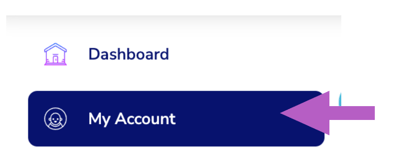
- From the navigation menu, click My Account
- Click on the 'Bio' tab
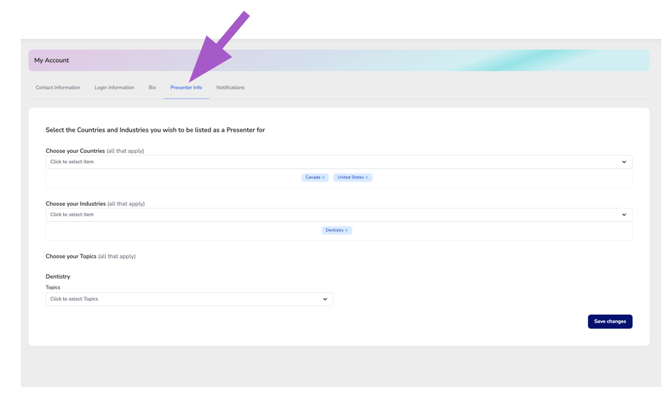
Countries
Select the countries where you actively present, teach, or offer educational content.
This helps organizations identify presenters familiar with specific regional audiences, regulations, licensing requirements, or educational markets.
You may select multiple countries if applicable.
Industries
Choose the industries you speak within or have professional expertise in.
Examples may include:
- Dentistry
- Healthcare
- Nursing
- Compliance
- Business & Leadership
- Clinical Education
Selecting the correct industries helps companies narrow down presenter searches and organize speakers by specialty area.
Topics
Topics allow you to further define the educational subjects you teach within each selected industry.
For example, under Dentistry, you may select topics such as:
- Infection Control
- OSHA
- Radiology
- Human Trafficking
- Practice Management
- Clinical Techniques
- Compliance & Regulations
Adding accurate topics gives companies a clearer understanding of your speaking expertise and helps improve speaker-to-course matching.
Keeping Your Presenter Information Updated
Your presenter information should be reviewed and updated regularly as your speaking specialties, industries, or educational focus evolve.
Keeping this information current improves your visibility and helps offering companies confidently connect you to the most relevant educational opportunities.
After making updates, click “Save Changes” to apply your presenter information settings.