
-
Go to any dashboard view associated with your personal CE Zoom account
Navigate to the top of your screen where your dashboard type (Professional, Presenter, or Employee) is listed.
- Open the Dashboard Dropdown
Click the dropdown arrow next to your current dashboard.
The menu will expand to display all roles and dashboards currently available to your account.

-
Select the Dashboard You Want to View
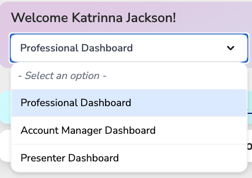
Click the dashboard you would like to access.
For example, you may select:
- Professional Dashboard — manage your personal licenses, CE, compliance, and membership features.
- Account Manager Dashboard — access and manage the company or organization accounts you are connected to.
- Presenter Dashboard — access tools associated with your presenter role.
Once selected, CE Zoom will switch you to the dashboard associated with that role.