
Overview
The Credentialing & Doc Compliance Manager allows your organization to choose which credentials and documents you want to monitor.
If your organization no longer needs visibility into a particular credential or document, you can remove its Compliance Group from the manager.
Removing a group does not delete the credential or document from a team member’s CE Zoom account. It simply removes the card from your organization’s Compliance Manager so its compliance statistics are no longer monitored or displayed.
How to Remove a Credentialing & Doc Compliance Group
1. Go to the Credentialing & Doc Compliance Manager
From your Executive Suite or Office Manager Dashboard, scroll down to the appropriate section:
-
Team Member Credentialing & Doc Compliance
Tracks credentials and documents maintained by individual team members, such as DEA registrations, malpractice insurance, and radiology badges.
-
Office Credentialing & Doc Compliance
Tracks credentials and documents maintained by the office or organization, such as business licenses, liability insurance, permits, and other organizational records.
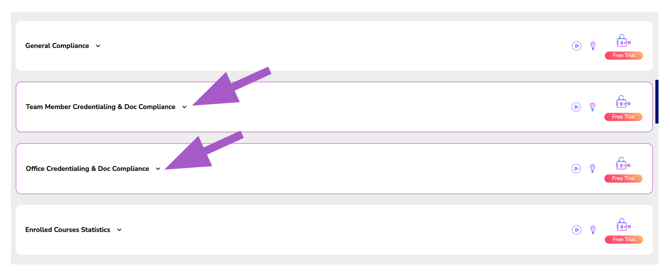
Click the appropriate section to expand the Compliance Manager.
2. Locate the Credential or Document
Find the Credentialing & Doc Compliance Group card you no longer want your organization to monitor.
Use the Search field if needed to quickly locate a specific credential or document.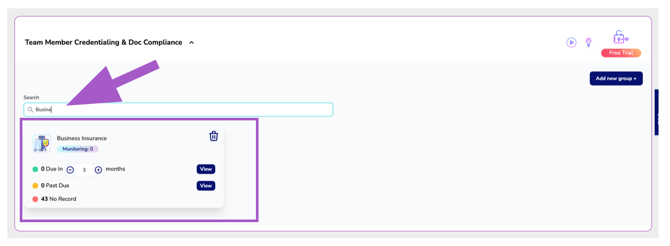
3. Click the Trash Icon
Click the trash icon located on the Compliance Group card you want to remove.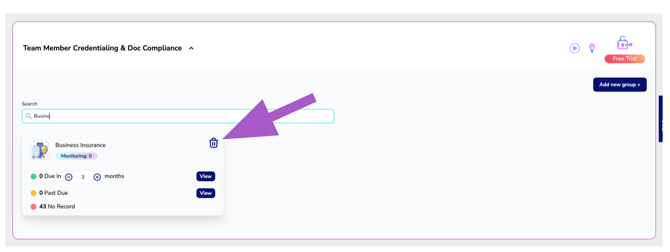
4. Confirm the Removal
A confirmation window will appear displaying the credential or document you selected.
Review the information to make sure you are removing the correct group.
Click Remove to confirm.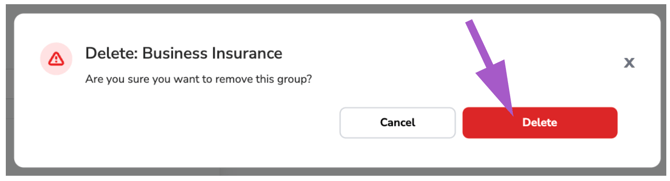
To keep the group, click Cancel or close the window without making any changes.
What Happens After a Group Is Removed?
Once removed, the credential or document will no longer appear in your organization’s Credentialing & Doc Compliance Manager, and CE Zoom will stop displaying compliance statistics for that group.
This does not remove or alter any credentials or documents stored in your team members’ Professional accounts.
If your organization needs to monitor the credential or document again in the future, you can simply add the Compliance Group back to your manager.