
Designing Your Survey
The Question Types section is where you select the type of question you want to add to your survey. Questions are added one at a time, allowing you to build a survey that collects the specific feedback and information you need from attendees.
Each time you add a question, you will first select the question type. Once selected, the corresponding question template will appear, allowing you to enter the question details and configure any available options.
Available Question Types
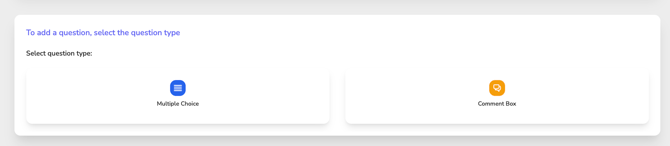
Multiple Choice
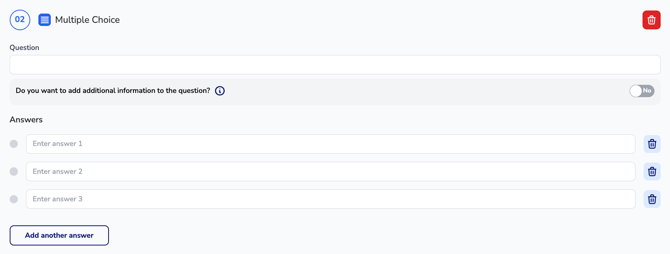
Use a Multiple-Choice question when attendees should select from a predefined list of answer options.
Multiple-Choice questions are ideal for:
- Course evaluations and ratings
- Satisfaction surveys
- Yes/No questions
- Gathering structured feedback that can be easily reported and analyzed
When creating a Multiple-Choice question, you will enter the question text and define the available answer choices.
Comment Box

Use a Comment Box question when attendees should provide a written response in their own words.
Comment Box questions are ideal for:
- Open-ended feedback
- Suggestions and recommendations
- Additional comments
- Detailed attendee responses that cannot be captured through predefined answer choices
When creating a Comment Box question, you will enter the question text and optionally provide additional instructions to guide the attendee's response.
Adding Questions
After selecting a question type, the appropriate question template will appear for you to complete. Continue selecting question types and creating questions until your survey contains all the questions needed to gather attendee feedback.
Questions are added individually, allowing you to combine Multiple Choice and Comment Box questions within the same survey to create a customized evaluation experience.